


With the heavy lifting done in creating the site building mechanics and a solid foundation to build and share upon; our final objective is to automate the process of connecting these two stages.
Release Pipeline
Technically the goal we are speaking about is the Release Pipeline which will take the artefact (our site .ZIP file) that we created in the Build Pipeline in our previous topic Constructing a new Home with Jekyll and Azure DevOps; and publish this to our storage account.

With the heavy lifting done in creating the site building mechanics and a solid foundation to build and share upon; our final objective is to automate the process of connecting these two stages.
Release Pipeline
Technically the goal we are speaking about is the Release Pipeline which will take the artefact (our site .ZIP file) that we created in the Build Pipeline in our previous topic Constructing a new Home with Jekyll and Azure DevOps; and publish this to our storage account.
In simple terms, we are going to Unzip the archive to the storage, which is configured to expose the content as a website, and to increase performance we are leveraging a content delivery network.
Copying Content
As with our Build Pipeline there are a few different options on how to accomplish the work.
Currently Azure DevOps is not exposing the release pipelines in an Infrastructure as Code configuration so we will complete this in the portal.
We begin with a new Release Pipeline, add add the task Azure File Copy, and set the settings similar to the following:
| Setting | Value |
|---|---|
| Display Name | Azure Blob File Copy |
| Source | $(System.DefaultWorkingDirectory)/_Jekyll Builder/_site |
| Azure Connection Type | Azure Resource Manager |
| Azure Subscription | My Azure Subscription |
| Destination Type | Azure Blob |
| Storage Account | Name of the Storage Account you created, e.g. My Blog |
| Container Name | $web |
Done!, Seriously; pretty easy right!
Replace Content
One small issue with the previous approach is that it merely overwrites the content in the blob with the latest version, but it failed to remove any content which might have been removed from the site.
Currently, there is no equivalent to the magic XCOPY command that will sync the blob removing the data that is no longer required; that’s a project for another day.
The quick and dirty fix for this scenario is first to delete the existing content and then deploy the latest version. This would typically result in a potential outage as the content vanishes for a little time; however, we do not have that concern, because we have decided to use a Content Delivery Network which caches our site.
Task 1
| Setting | Value |
|---|---|
| Display Name | Delete Old Files |
| Azure Subscription | My Azure Subscription |
| Script Location | Inlineaz storage blob delete-batch --source $web --account-name $(storageAccount) --output table |
Task 2
| Setting | Value |
|---|---|
| Display Name | Upload Fresh Content |
| Azure Subscription | My Azure Subscription |
| Script Location | Inlineaz storage blob upload-batch --source _site --destination $web --account-name $(storageAccount) --output table --no-progress |
Tiggers Ready
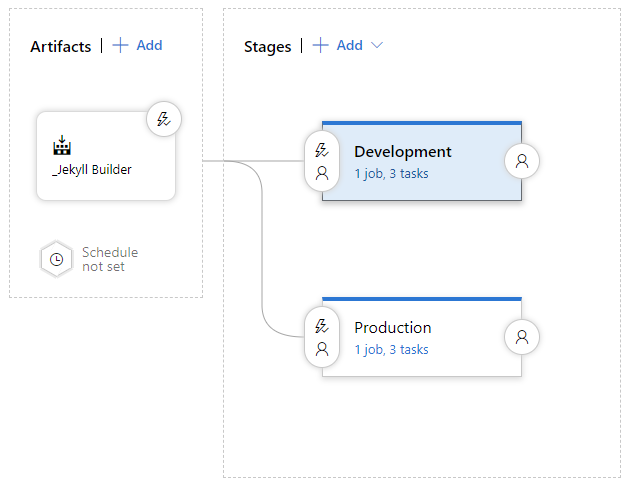
The last point to consider is When should this deployment happen, and that’s also pretty obvious when we think about it.
Every time we have a good build of the site, we should check to see which branch just completed the process, and update the relevant site based on this information.
Summary
Which flow you choose to implement are entirely at your discretion; As I am currently doing much work on the taxonomy of the site; I have implemented the second option of delete and redeploy; but I do in the plan to come back and optimize this by adding a sync process which will be far more efficient.


More articles

Implementing Comments on a Static Site
At this point we are almost ready to go live with our site, however, one of the cornerstones to growing and sharing is communication.
Wordpress
In the world of Wordpress, this was a standard core feature, which leveraged the fact that the pages were rendered on demand from a backend database. In this scenario, the same approach is offered to maintain a commenting platform.

Laying the foundation in Azure for a Static Site
Hosting my site on Wordpress was not super complex; I leveraged the Azure PaaS Services for Web Apps, and orginally the 3rd party support for hosted MySQL database’s. Once I was up and running I quickly realised that all media hosted on the site were landing on the webserver, so a plugin from its marketplace offered the ability to relocate the media to an Azure Blob; offloading some of the challanges.

Constructing a new Home with Jekyll and Azure DevOps
One of the unspoken truths behind the lack of posts in recent history was due to a few bugs, which in the end resulted in an experience where from home it appeared that any new content was published and working; but outside this fortress in the real world, there was a large silence echoing.
I really only discovered this issue in May of this year, and was, to say the least, a little agitated with the situation and decided then to change the approach to how I save my notes and share my thoughts.